DISTRIBUTOR-FIRST SUPPLY PARTNER · SINCE 1999 Live · Pneumatic Automation System

SPC Company
Pneumatic Automation / Actuation / Vacuum End-Effectors / Vacuum Sensor / Switch
Layer 04 · Actuation Industry Leader · SMC
01What it is

Vacuum Sensor / Switch

A vacuum sensor / switch is the verification device on a pick-and-place vacuum circuit — it monitors the live vacuum level and tells the PLC (programmable logic controller — the machine's control computer) whether the workpiece is actually gripped before the robot moves. It is one quarter of the vacuum end-effector sub-system: ejector + suction cup + vacuum sensor + replacement cup, sold and quoted together. The switch carries two adjustable set points — grip-confirm (releases the machine to move) and drop-detect (alarms a part lost mid-cycle) — and mounts on the EOAT (end-of-arm tooling) plate or in a tee within 6 inches of the cup. Without a switch, a machine can complete its motion with no part on the cup and collide with downstream equipment.
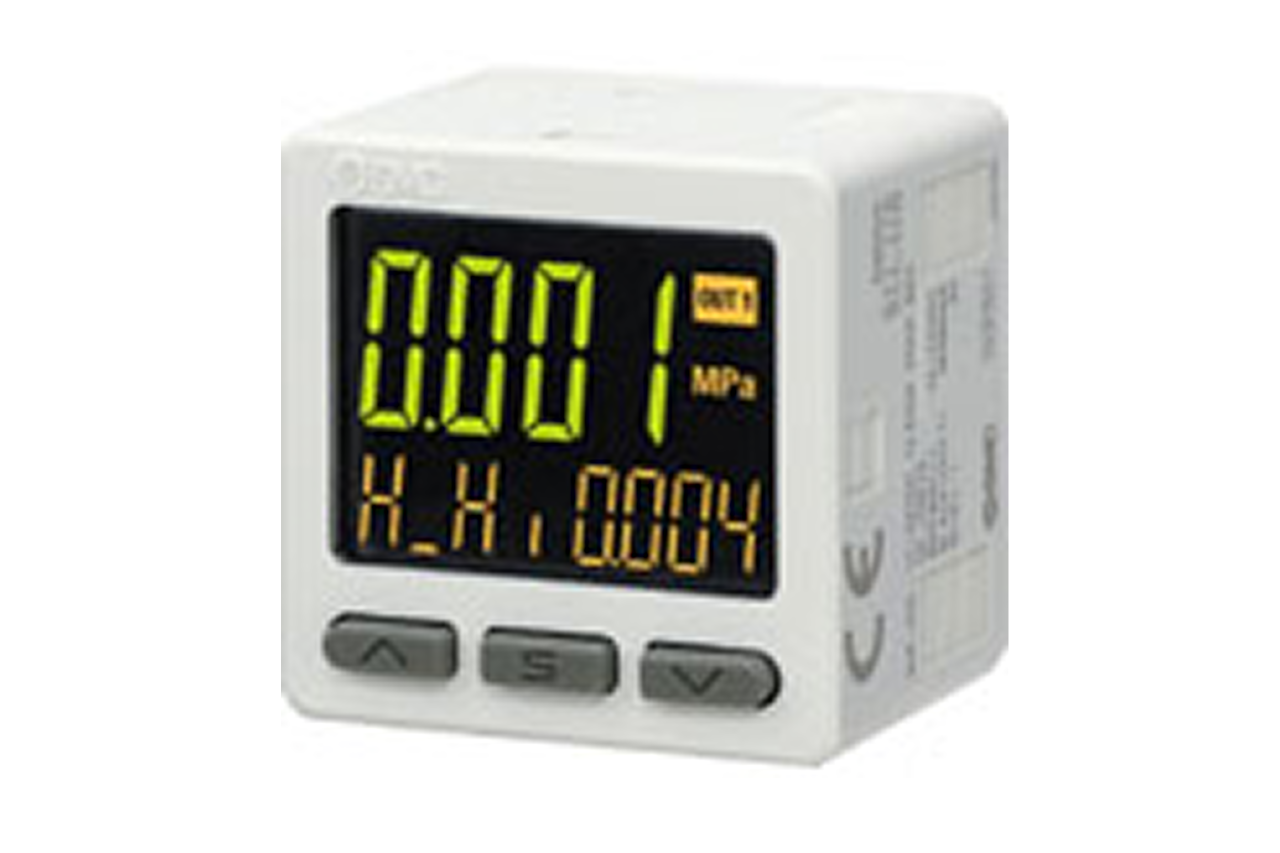
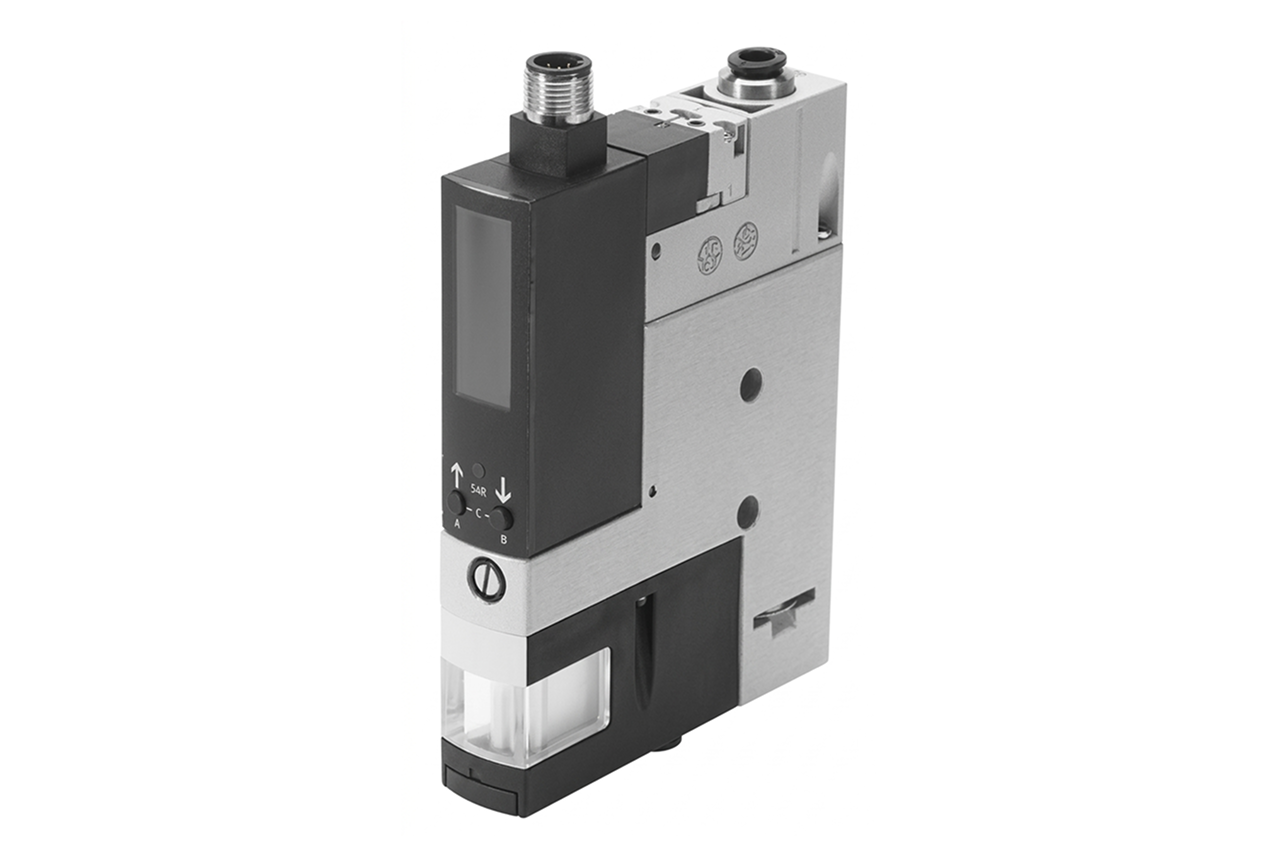
Real-world reference Representative vacuum sensor / switch
Vacuum Sensor / Switch — representative product photo
02Why it's needed

Why this matters.

Tips and pointers on when to add vacuum verification — and where a switch alone won't save you. Scroll the strip →

01 · Key point
Verifies grip before motion.

A vacuum sensor / switch tells the PLC whether the part actually latched before the robot moves. Without it the machine operates on faith — and a lift with no part on the cup ends in a downstream collision.

02 · Key point
Two set points, two jobs.

Grip-confirm sits 10–15% below steady-state vacuum and releases the move command. Drop-detect sits 30–40% below and alarms a part lost mid-cycle. One device, two independent outputs into the PLC interlock.

03 · Key point
Set seal-integrity thresholds.

Switching response is a few milliseconds — fast enough to catch seal loss within one PLC scan cycle. Operating range typically –20 to –27 inHg (inHg = inches of mercury); set points must be re-verified whenever the workpiece changes.

04 · Pro tip
Match switching to the PLC.

NPN vs. PNP output polarity must match the PLC input card — the most common install-day mismatch. Digital display for field tuning, basic switched for cost, IO-Link for continuous 16-bit vacuum value to the network. Compound range when the circuit alternates vacuum with positive blow-off.

05 · Where not to use
Switch installed but not wired.

The most common configuration failure on retrofits: switch reads vacuum correctly, output never lands in the move-permission rung. The hardware is useless without the PLC logic. → Wire grip-confirm into move-permission and drop-detect into alarm/abort at every install.

06 · Where not to use
Mounted far from the cup.

A switch tapped at the ejector or manifold reads reach vacuum, not cup vacuum — false grip-confirm before the cup actually seals. → Mount within 6 inches of the cup on the EOAT block or in a tee on the cup line.

07 · Where not to use
Vacuum-only on a blow-off circuit.

A vacuum-only switch faults on positive pressure — and integrated blow-off blocks, test stands, and leak detectors cycle both. → Switch to compound-range variant for vacuum + positive pressure on the same line.

03Key selection criteria

What we need to spec it right.

From the machine spec sheet → to the part number. Answer what you know — leave the rest blank — and send.

01 · Input
Does the machine need to verify grip before motion? Production picks where dropping the part causes damage or quality issues → yes, one switch per circuit. Bench prototype or non-critical handoffs → usually no.
One switch per critical circuit · One switch on manifold (multi-cup, non-critical zones) · Per-cup switches (individual verification on safety-critical arrays) · None (non-critical, bench)
02 · Input
Three tiers by capability. Basic switched gives contacts only at lowest cost. Digital display adds live readout and field-tunable set points for commissioning. IO-Link adds continuous 16-bit vacuum value to the PLC network with recipe-driven set points.
Basic switched output (cost-driven) · Digital display (field tuning, commissioning) · IO-Link (continuous data, recipe set points) · IO-Link + master node (no existing master)
03 · Input
Set points must sit with margin buffer inside the switch's range. Pull steady-state from the matched ejector + cup combination. Compound range required wherever the circuit alternates vacuum grip with positive blow-off — vacuum-only switches fault on positive pressure.
Vacuum-only (–20 to –27 inHg typical ejector circuit) · Compound (vacuum + positive pressure — blow-off, test stands, leak detectors)
04 · Input
NPN vs. PNP transistor polarity is the most common install-day mismatch. Voltage must match the PLC supply. Dual-output models need an assignment for which output is grip-confirm and which is drop-detect — pull from the PLC input card spec.
NPN 24 VDC · PNP 24 VDC · NPN/PNP 12 VDC · Analog 1–5 V / 4–20 mA (continuous monitoring) · IO-Link M12 (digital only)
05 · Input
Confirm against the application — washdown, wet, or outdoor environments need IP65 or higher; clean indoor cells can run IP40.
IP40 (clean indoor cells) · IP65 (washdown, wet, outdoor — IO-Link variants default here) · IP67 (heavy washdown)
06 · Input
Match the switch's pressure port to the vacuum-line plumbing on the EOAT block or tee within 6 inches of the cup.
M5 (compact EOAT) · 1/8" Rc / NPT (standard manifold) · One-touch tube fitting (4mm, 6mm)
07 · Input
Number of pieces for this configuration. One switch per detection point — match to the ejector + cup count. Multi-cup EOAT? Add separate quote lines if specs differ between positions. Switches don't wear, but stock one spare per installed unit with pre-documented set points to turn a multi-hour outage into a 15-minute swap.
1–10 pcs (per-circuit on new build) · 25–100 pcs (machine MRO, IO-Link retrofit) · 500+ pcs (OEM build lot)

Need different sizes, colors, or quantities? Fill the form, add to quote, then fill again — each click is one quote line.

04Choose your solution tier  ·  core differentiator

Whatever your lever — spec, value, or price — SPC has the right brand.

Most distributors sell one brand per product type. SPC's 60-brand portfolio means every Product Type page surfaces three real options matched to how your customer is buying today. Pick the tier; the quote desk handles the cross-reference.

05How to sell this  ·  distributor talk track

The tier conversation closes the deal. The cross-reference catalog wins the next one.

The switch is the verification layer on every vacuum pick that matters. If the cost of a dropped part — broken tooling, scrap, recovery time — exceeds the switch cost by 5x or more, the switch is mandatory. That covers essentially every production pick.
The SPC difference · how distributors actually buy

The 30-second positioning

Sell the sub-system, not the switch. Every switch quote is four lines: ejector + suction cup + vacuum sensor (this PT) + replacement cup on a standing-reorder schedule. Quote the matched ejector and cup alongside every switch as the complete EOAT block.

Tier: Industry Leader tier — IO-Link-ready, robust IP rating, full IODD library, tight unit-to-unit repeatability. Emerging tier covers basic switched outputs with digital display at lower price — viable on standalone picks where IO-Link isn't in scope. Import-tier covers generic switches with basic switched output only, no display, lower repeatability — suitable for non-critical monitoring or for replacing failed analog gauges.

The structural conversation — four pieces. Identify the picks that matter (production picks where a drop causes damage or quality issues → yes; bench-prototype → usually no). Get the operating vacuum range (ejector + cup combination produces -20 to -27 in-Hg steady-state; grip-confirm sits 10-15% below, drop-detect sits 30-40% below). Get the integration target (discrete PLC input vs. digital display vs. IO-Link node). Match output type and voltage to the PLC (NPN vs. PNP, 12-24 VDC).

Recurring economics: attach rate, not replacement. Solid-state pressure transducers run for years. The recurring revenue is that every new ejector circuit specified adds one switch. Customers retrofitting older lines to add vacuum verification — driven by an insurance claim, quality audit, or near-miss — order switches in batches matched to existing ejector count. IO-Link migrations are another batch driver.

Customer cue → talk move

"Robot is dropping parts and we don't know why"
First question: is there a switch installed and wired into the PLC interlock? If no switch, this is the immediate fix. If installed but not wired, complete the wiring. Quote switches for any picks running without them.
"Collision on the line — robot lifted with no part"
Same root cause. Grip-confirm wasn't verified before the move command. Walk the customer's PLC logic to confirm move-permission requires grip-confirm = true. Highest-ROI safety upgrade on the machine.
"Need vacuum data on the PLC, not just contacts"
IO-Link variant. Reports live vacuum value continuously over a single 4-wire connection; PLC can trend, alarm on drift, and predict cup wear from vacuum-level decay over thousands of cycles. Quote the IO-Link master alongside if the customer doesn't have one.
"Operators keep adjusting set points"
IO-Link or digitally-configured switch with set points locked at the PLC. Field-adjustable set points are great for commissioning, problematic in production where operator drift causes inconsistent grip.
"Multiple product variants on the same machine"
IO-Link sensor with recipe-driven set points. Different parts have different cup volumes and steady-state vacuum levels; one set point across all variants causes false drop-detect on low-vacuum variants.
"Just want to know if grip is good, nothing fancy"
Basic NPN or PNP switched output, digital display optional. Pick the right voltage and output type for the PLC; pair with matched ejector and cup; done. Don't over-specify IO-Link if the customer's PLC and network aren't set up for it.
"Can we use this on positive pressure too"
Compound-range model. Reads vacuum and low positive pressure on the same device. Useful on blow-off circuits or test stands. Vacuum-only models fault on positive pressure — quote the compound variant explicitly where blow-off is in scope.
06Where it's used

Industries served.

Each industry below uses this product across the listed areas. Open an industry to see how it fits the rest of its system.

Also applies to Robotic EOAT on production pick-and-place · Test fixtures and inspection stands · Sheet-metal pick-and-place · Especially important on multi-sheet stack picking where double-blanking is a press-safety event. · Compound applications (vacuum + positive pressure on the same circuit)

09Install · 6 critical steps

The things that matter on the first install.

Step 01
Confirm voltage, output type, and signal level against the PLC input card
NPN vs. PNP is the most common install-day mismatch. 12-24 VDC must match the PLC supply. For dual-output models, identify which output is grip-confirm and which is drop-detect on the wiring diagram. For IO-Link, confirm the master port supports the device's baud rate (typically COM3 / 230.4 kbps for vacuum sensors).
Step 02
Plumb the switch as close to the cup as practical
The switch reads vacuum at its install location — every fitting and inch of hose between the switch and the cup is volume that delays the reading. Mount on the EOAT block adjacent to the cup, or in a tee within 6 inches. Switches mounted on the manifold near the ejector show reach faster than actual grip and cause false grip-confirm at the PLC.
Step 03
Set the grip-confirm threshold first
Run a cycle without product to record the no-load vacuum ceiling. Run a cycle with product to record steady-state grip vacuum. Grip-confirm sits 10-15% below steady-state grip vacuum — high enough to confirm seal, low enough to tolerate variation. On a digital-display switch, use the tactile button; on IO-Link, set via the IODD (IO-Link device description file — the manufacturer's spec the PLC loads to know how to talk to the device) in the PLC.
Step 04
Set the drop-detect threshold second
Drop-detect sits 30-40% below steady-state grip vacuum, or just above the no-load ceiling. Low enough that normal grip variation doesn't false-trigger, high enough that an actual lost part is caught within milliseconds. Verify by manually breaking the seal during a cycle and confirming the PLC sees the drop signal within one scan cycle.
Step 05
Wire grip-confirm into the move-permission interlock
The move command in the PLC must be conditional on grip-confirm = true. Wire the switch's grip-confirm output to a discrete input and reference that input in the move-permission rung. Without this interlock, the switch is installed but ineffective — the most common configuration failure on retrofit lines.
Step 06
Wire drop-detect into the alarm / abort logic, then document set points
Drop-detect latches an alarm condition and aborts the current motion. Decide with the customer: drop = full machine stop (precision fixturing), drop = move complete + alarm (case packing), or drop = retry (high-cycle production). For IO-Link, load the IODD, confirm the sensor reports process value + status byte + diagnostic flags, set up HMI trending. Record grip-confirm and drop-detect set points on the machine drawing — undocumented set points are a multi-hour problem on every spare swap.
10Troubleshoot · top failures

Most returns trace to one of these causes.

Symptom
Most likely cause
Fix
Switch shows grip-confirm but the machine still drops parts on the move
Grip-confirm set too low (false confirmation at marginal vacuum), switch installed too far from the cup (reading ejector vacuum, not cup vacuum), cup wear allowing intermittent seal loss after initial confirmation, or workpiece variation causing seal break mid-move.
Re-measure steady-state grip vacuum on a known-good pick and raise grip-confirm to sit 10-15% below that value, not at the no-load ceiling. Relocate the switch closer to the cup. Inspect cup contact face for wear or contamination. If variation is the cause, tighten drop-detect so any seal break is caught immediately.
False drop-detect alarms during normal cycles (line stopping unnecessarily)
Drop-detect set too tight (cutting into normal grip variation), supply pressure fluctuation causing vacuum dips, cup seating taking longer than the response window on porous workpieces, or workpiece variation pulling vacuum below threshold momentarily.
Loosen drop-detect — it should sit 30-40% below steady-state, not 10%. If margin is already correct, check supply pressure stability under cycle load. On porous surfaces, consider an ejector with higher suction flow to maintain vacuum against bleed-in. For variable workpieces, IO-Link with recipe-driven set points solves the variation problem.
Switch installed but the PLC isn't responding to grip-confirm or drop-detect signals
Wiring not connected to the PLC interlock (most common), wrong output type for the PLC input (NPN switch on PNP input or vice versa), voltage mismatch, or the PLC program doesn't reference the switch inputs in the relevant interlocks.
Verify wiring against the PLC schematic — confirm switch outputs are landed on the correct input addresses. Check NPN/PNP compatibility with the PLC card. Walk the PLC program with the customer's controls engineer and confirm grip-confirm is referenced in move-permission logic and drop-detect is referenced in alarm logic.
Digital display reading drifts or shows erratic values
Electrical noise on supply or signal lines, condensation or contamination inside the sensor housing (lower-IP model in wet environment), supply voltage out of spec, or sensor at end of life.
Verify supply voltage is stable and within rated range. Check shielding integrity on the cable run. Inspect housing for moisture ingress; replace with a higher-IP model (around IP65) if installed in a wet or washdown environment. If all electrical checks pass and the sensor still drifts, replace the unit.
IO-Link sensor not appearing on the network or not reporting data
IODD file not loaded in the PLC, wrong baud rate on the IO-Link master port, M12 cable not landed correctly (pin assignment varies between IO-Link and standard digital), or sensor configured for a different IO-Link revision than the master supports.
Load the manufacturer's IODD for the exact sensor model. Set the master port to the device's baud rate (typically COM3). Verify M12 cable pinout matches IO-Link spec. Confirm the master supports the sensor's IO-Link revision (1.1 vs. 1.0); newer sensors on older masters sometimes default to digital mode silently.
Set points reset themselves or drift between shifts
Operators adjusting set points on display models without authorization (most common), supply voltage cycling causing memory issue on lower-end sensors, or vibration on the EOAT loosening the tactile button.
Lock set points via the device's configuration mode — most digital-display switches have a lock that disables field adjustment. On IO-Link, set points are stored in the PLC and survive any device replacement. Document the locked set points and train operators that adjustment requires maintenance involvement.

Get the right vacuum sensor / switch on quote in 24 hours.

Send us the application — a specialist routes you to the correct tier with a configured part. Lead-times and pricing returned within one business day.

Request a quote